

Optimizing Incident Management with ServiceNow: Best Practices and Automation

Optimizing Incident Management with ServiceNow: Best Practices and Automation

In today’s fast-paced digital world, IT incidents are inevitable. From minor glitches to major outages, their impact on business operations, user productivity, and customer satisfaction can be significant. This is where robust incident management comes in – a critical IT Service Management (ITSM) process focused on restoring normal service operation as quickly as possible. And when it comes to optimizing this crucial function, ServiceNow stands out as a powerful platform.

ServiceNow’s incident management capabilities are designed to streamline the entire incident lifecycle, from identification and logging to resolution and closure. But simply having the tool isn’t enough; true optimization comes from implementing best practices and leveraging automation effectively.

The Core of Efficient Incident Management: Best Practices

Before diving into automation, let’s explore the fundamental best practices that lay the groundwork for effective incident management in ServiceNow:

  1. Clear Roadmap and Objectives: Begin with a well-defined vision for your ServiceNow ITSM initiatives. What problems are you trying to solve? How will incident management fit into your existing workflows? A comprehensive roadmap with clear KPIs and metrics is essential for measuring progress and success.
  2. High-Quality Data is Paramount: “Garbage in, garbage out” applies perfectly here. Ensure your data is accurate, consistent, and up-to-date. Clean data is the backbone for efficient processes, intelligent routing, and meaningful analytics.
  3. Start Small, Scale Smart: Don’t try to implement everything at once. Begin with a manageable project, learn from the challenges, and then gradually scale up for broader impact. This iterative approach allows for fine-tuning and adjustments.
  4. Stakeholder Collaboration: Involve all key stakeholders – end-users, IT staff, and business leaders – throughout the process. Their buy-in and feedback are crucial for successful adoption and continuous improvement.
  5. Leverage Out-of-the-Box Functionality: ServiceNow offers a wealth of pre-built functionalities. Prioritize using these whenever possible to minimize customizations, which can complicate upgrades and maintenance. Only customize when absolutely necessary to meet specific business needs.
  6. Phased Rollout: Consider a phased implementation instead of a big-bang switchover. This allows users to familiarize themselves with the platform and provides time for adjustments before full deployment.
  7. Continuous Monitoring and Optimization: Once ServiceNow is live, constantly monitor its usage, track user adoption, and identify areas for improvement. Be prepared to adjust configurations, add new features, and refine processes based on evolving needs.
  8. Stay Updated: ServiceNow regularly releases updates with new features and functionalities. Staying current ensures you benefit from the latest improvements and maintain platform security.

The Power of Automation in ServiceNow Incident Management

ServiceNow truly shines when you harness its automation capabilities. Automation can significantly reduce manual effort, speed up resolution times, and improve consistency. Here’s how:

  1. Automated Incident Creation from Monitoring Systems: Integrate ServiceNow with your IT Operations Management (ITOM) tools. When a monitoring system detects an anomaly or an issue (e.g., a server goes down, an application crashes), ServiceNow can automatically create a high-priority incident, categorizing it based on business impact. This proactive approach minimizes disruption by identifying problems before users even report them.
  2. Intelligent Routing and Assignment: Gone are the days of manual incident assignment. Leverage ServiceNow’s capabilities to automatically route incidents to the correct support group or individual based on factors like:
    • Categorization: Classify incidents by type, sub-type, and affected service.
    • Prioritization: Automatically assign priority based on impact and urgency, ensuring critical issues are addressed first.
    • Skills and Availability: Route incidents to agents with the necessary expertise and who are currently available. Machine learning can further refine this by learning from past assignments.
  3. Self-Service and Virtual Agents: Empower users to find answers and resolve common issues themselves through a self-service portal and AI-powered virtual agents (chatbots). These agents can:
    • Deflect incidents by providing immediate solutions from a knowledge base.
    • Guide users through troubleshooting steps.
    • Collect necessary information before an incident is escalated to a human agent, reducing resolution time.
  4. Automated Notifications and Communication: Keep all stakeholders informed with automated notifications. This includes:
    • Automatic updates to affected users on the status of their incident.
    • Notifications to relevant teams for critical incidents.
    • Automated escalations when an SLA is about to be breached or has been breached.
  5. Automated Resolution Playbooks: For recurring incidents with well-defined resolution steps, create automated playbooks. These workflows can:
    • Trigger scripts to restart services.
    • Apply patches.
    • Perform automated checks and diagnostics.
    • Guide agents through a task-oriented view of resolution steps, ensuring consistency and reducing human error.
  6. Predictive Intelligence and AIOps: ServiceNow’s AI capabilities (like Predictive Intelligence and AIOps) take automation to the next level:
    • Predictive Analysis: Machine learning models can analyze historical data to predict potential incidents before they occur, enabling proactive prevention.
    • Anomaly Detection: AI can identify subtle deviations from normal system behavior, flagging potential issues that might otherwise go unnoticed.
    • Root Cause Analysis: AI can assist in quickly identifying the underlying cause of incidents, leading to more permanent fixes.
    • Automated Remediation: For certain predictable issues, AI can even initiate autonomous resolution actions, minimizing or eliminating human intervention.

Benefits of Optimized Incident Management with ServiceNow

By combining best practices with strategic automation, organizations can reap significant benefits:

  • Faster Resolution Times (MTTR): Automation and intelligent routing drastically reduce the time it takes to resolve incidents, minimizing business disruption.
  • Reduced Manual Effort and Cost: Automating repetitive tasks frees up IT staff to focus on more complex and strategic initiatives.
  • Improved User Experience: Self-service options and faster resolutions lead to happier and more productive employees.
  • Increased Consistency and Compliance: Automated workflows ensure that incidents are handled consistently and according to defined policies and compliance requirements.
  • Proactive Issue Prevention: Leveraging ITOM and AI allows for the detection and resolution of issues before they impact users, shifting from a reactive to a proactive stance.
  • Enhanced Visibility and Reporting: A single system of record provides comprehensive insights into incident trends, allowing for continuous improvement and better decision-making.

Conclusion

Optimizing incident management with ServiceNow is not a one-time project; it’s an ongoing journey of continuous improvement. By embracing best practices, strategically implementing automation, and leveraging the power of AI, organizations can transform their IT operations from reactive firefighting to proactive, efficient, and highly effective service delivery. This ultimately leads to a more resilient IT infrastructure, increased productivity, and a superior experience for both IT teams and end-users.
Beyond the Out-of-the-Box: Tailoring ServiceNow ITSM for Your Unique Business

Beyond the Out-of-the-Box: Tailoring ServiceNow ITSM for Your Unique Business

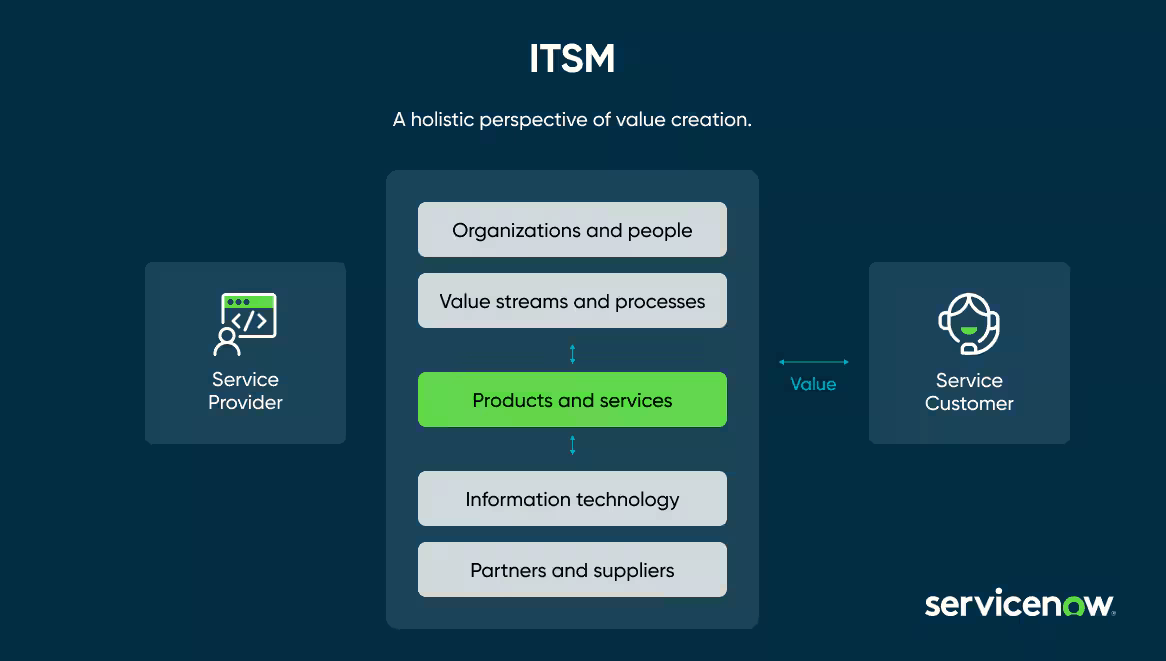
ServiceNow ITSM is a powerhouse. Its robust framework and comprehensive modules offer a fantastic foundation for managing IT services. But let’s face it: every business operates differently. Your specific workflows, unique challenges, and distinct priorities might not perfectly align with the standard configuration. That’s where the magic of customization comes in.

Customizing your ServiceNow ITSM instance isn’t about breaking what’s already there; it’s about molding it to fit your organization like a glove. It’s about enhancing efficiency, streamlining processes, and ultimately, delivering greater value to your stakeholders.

Why Embrace Customization?

The benefits of tailoring ServiceNow ITSM are numerous and impactful:

  • Enhanced Efficiency: By aligning workflows with your specific business processes, you eliminate unnecessary steps and bottlenecks, allowing your teams to work smarter, not harder. Imagine automating a multi-step approval process that was previously manual – the time savings can be significant.
  • Improved User Experience: A customized interface and tailored forms can make the platform more intuitive and user-friendly for both IT staff and end-users. This leads to increased adoption, reduced errors, and greater satisfaction. Think about presenting only the relevant fields on an incident form based on the reported issue category.
  • Better Data Insights: Customizing reporting and dashboards allows you to track the metrics that truly matter to your business. You can gain deeper insights into performance, identify trends, and make data-driven decisions that directly impact your strategic goals. Consider creating a dashboard that specifically tracks SLA compliance for critical business services.
  • Increased Agility and Adaptability: As your business evolves, your ITSM platform needs to evolve with it. Customization provides the flexibility to adapt to new requirements, integrate with other systems, and support future growth.
  • Competitive Advantage: A well-tailored ITSM system can be a significant differentiator, enabling you to deliver superior IT services and support, ultimately contributing to a stronger bottom line.

Where to Begin Your Customization Journey:

Embarking on a customization project requires a thoughtful and strategic approach. Here are key areas to consider:

  • Workflow Automation: Identify repetitive, manual tasks within your incident, problem, change, and request management processes. Leverage ServiceNow’s Workflow Editor and Flow Designer to automate these tasks, freeing up your IT staff for more strategic initiatives.
  • Form Layouts and Fields: Review the standard forms and determine if they capture all the necessary information for your specific needs. Customize form layouts, add or remove fields, and implement UI policies to ensure data accuracy and a streamlined user experience.
  • Business Rules and Client Scripts: Implement business rules to automate actions based on specific conditions, ensuring data consistency and process adherence. Utilize client scripts to enhance user interaction and perform real-time validations on forms.
  • Notifications and Email Templates: Tailor notifications to provide relevant information to the right stakeholders at the right time. Customize email templates to align with your company branding and communication style.
  • Reporting and Dashboards: Design custom reports and dashboards that provide clear visibility into key performance indicators (KPIs) relevant to your business objectives. Leverage Performance Analytics to gain deeper insights and identify areas for improvement.
  • Integrations: Connect ServiceNow ITSM with other critical business applications, such as CRM, HR systems, and monitoring tools, to create a seamless flow of information and automate cross-functional processes.

Key Considerations for Successful Customization:

While the possibilities for customization are vast, it’s crucial to approach the process strategically:

  • Understand Your Business Requirements: Before making any changes, thoroughly analyze your existing processes, identify pain points, and clearly define your desired outcomes.
  • Prioritize and Plan: Not all customizations are created equal. Focus on the changes that will deliver the most significant value and develop a well-defined plan with clear objectives and timelines.
  • Follow Best Practices: Adhere to ServiceNow development best practices to ensure maintainability, scalability, and prevent potential issues during upgrades.
  • Test Thoroughly: Rigorous testing is essential to ensure that customizations function as expected and do not negatively impact other parts of the system.
  • Document Everything: Maintain comprehensive documentation of all customizations for future reference and to facilitate knowledge transfer.
  • Consider the Impact of Upgrades: Be mindful of how customizations might be affected by future ServiceNow upgrades and plan accordingly.

The Journey, Not Just the Destination:

Customizing ServiceNow ITSM is an ongoing journey. As your business evolves, so too will your ITSM needs. Regularly review your customizations, gather feedback from users, and make adjustments as necessary to ensure your platform continues to deliver optimal value.

By embracing the power of customization, you can transform your ServiceNow ITSM instance from a standard solution into a strategic asset that perfectly aligns with your unique business needs, driving efficiency, improving user satisfaction, and ultimately contributing to your organization’s success. So, take the leap beyond the out-of-the-box and unlock the full potential of your ServiceNow investment.

Navigating the ServiceNow Ecosystem: Understanding Different Modules and Their Applications

Navigating the ServiceNow Ecosystem: Understanding Different Modules and Their Applications

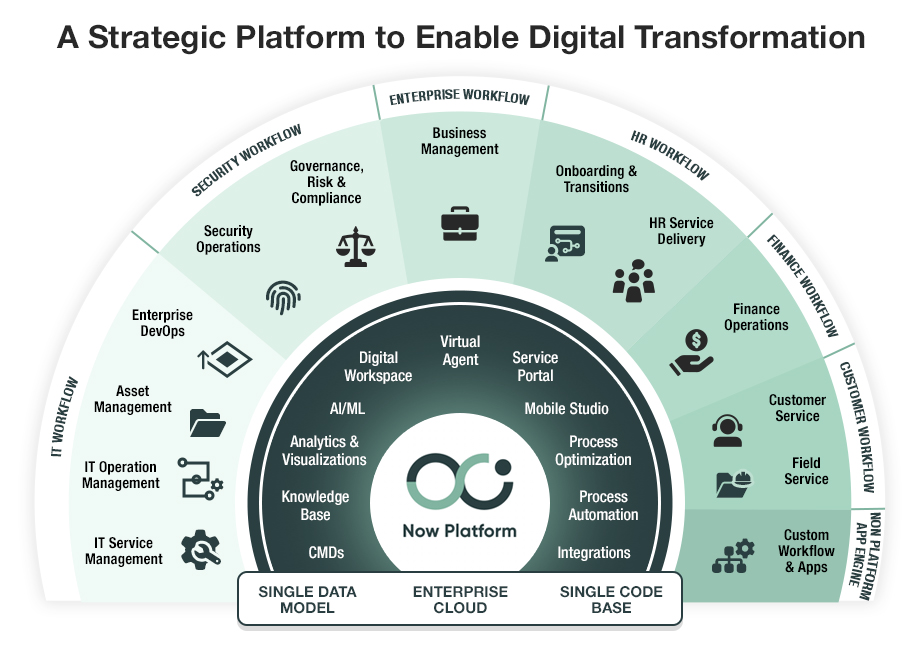
In today’s fast-paced digital landscape, organizations are increasingly relying on powerful platforms like ServiceNow to streamline operations, improve service delivery, and drive digital transformation. Known for its flexibility and comprehensive suite of applications, ServiceNow offers solutions across IT, HR, customer service, security, and more. But to truly unlock its potential, it’s essential to understand the various modules within the ServiceNow ecosystem and how they can be leveraged effectively.

Whether you’re a business decision-maker or an IT professional, working with a ServiceNow consultant in New York can be a strategic move to ensure the platform is implemented and customized to meet your specific needs.

What Is the ServiceNow Ecosystem?

The ServiceNow ecosystem refers to the platform’s integrated suite of applications designed to automate workflows across different business functions. Built on a powerful cloud-based architecture, ServiceNow allows organizations to break down silos, improve visibility, and drive efficiency through automation and centralized service management.

Let’s explore the key modules within the ecosystem and their practical applications.


1. IT Service Management (ITSM)

Application: Streamlining IT processes, automating service desk functions, and improving incident, problem, and change management.

Why it matters: ITSM remains one of the core modules of ServiceNow. It enhances service delivery while ensuring compliance and minimizing downtime. Companies often begin their ServiceNow journey here.


2. IT Operations Management (ITOM)

Application: Providing real-time visibility into infrastructure and services, improving uptime, and enabling proactive operations.

Why it matters: ITOM tools such as Discovery, Event Management, and Service Mapping help organizations predict issues before they affect the business, ensuring continuity and performance.


3. IT Business Management (ITBM)

Application: Aligning IT initiatives with business goals through project and portfolio management, resource optimization, and agile delivery.

Why it matters: ITBM enables better prioritization of projects, budget forecasting, and resource allocation, making it invaluable for CIOs and PMOs.


4. Customer Service Management (CSM)

Application: Improving customer satisfaction through case management, self-service portals, and omnichannel support.

Why it matters: CSM helps organizations shift from reactive to proactive service models, ultimately reducing resolution times and increasing customer loyalty.


5. HR Service Delivery (HRSD)

Application: Streamlining HR operations with digital onboarding, case management, and knowledge bases.

Why it matters: HRSD ensures that employees have a consistent and efficient experience, from day one through every HR interaction thereafter.


6. Security Operations (SecOps)

Application: Automating incident response and vulnerability management while integrating with security tools.

Why it matters: With cyber threats becoming more sophisticated, SecOps enables faster threat detection, prioritization, and remediation to protect business assets.


7. Governance, Risk, and Compliance (GRC)

Application: Managing risk, tracking compliance, and ensuring policy enforcement across the organization.

Why it matters: GRC helps reduce organizational risk and supports audit readiness with real-time dashboards and automated workflows.


Why Work with a ServiceNow Consultant in New York?

Navigating these modules can be overwhelming without the right expertise. Engaging a ServiceNow consultant in New York provides localized support with a global perspective. These consultants bring hands-on experience, industry best practices, and technical know-how to help tailor ServiceNow implementations to your business goals.

Whether you’re looking to improve service desk efficiency, automate HR workflows, or enhance customer engagement, a trusted consultant ensures faster ROI and long-term success.


Final Thoughts

The ServiceNow platform is vast, but its power lies in its modular design and adaptability. Understanding which modules align with your business needs—and deploying them strategically—is the key to maximizing value.

If you’re just starting out or aiming to scale your current implementation, consider partnering with a ServiceNow consultant in New York to guide your journey through the ecosystem with confidence.